Simulators tab
The Simulators tab in the System Manager accesses information on connected simulators and wireless bridges used in a LearningSpace system.
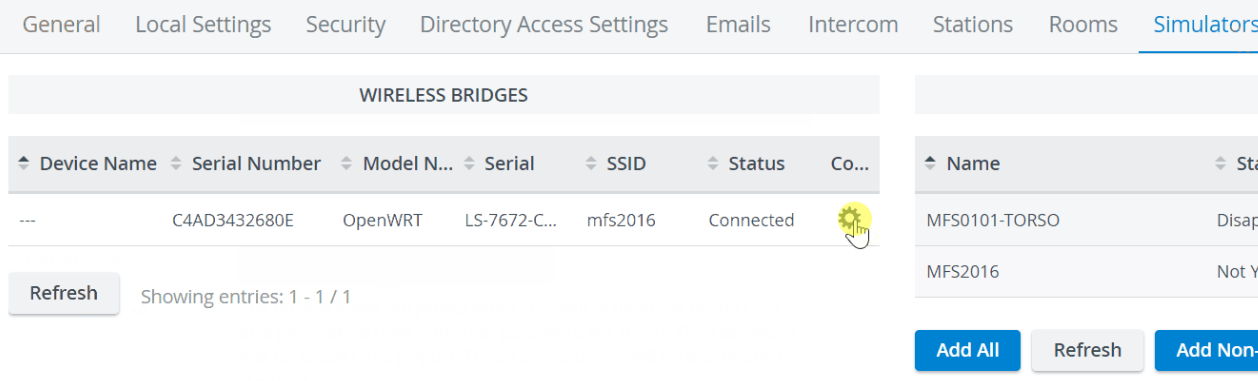
The Wireless Bridges tab displays
Device Name
Serial Number
Model Name
Serial (of the LearningSpace server)
SSID
Status
and the Controls for each device.

The Simulators tab displays each simulator's Name, Status, and Room, as well as its Simulation status and the Controls (to add/remove a simulator).

When using a wireless bridge, ensure that the appropriate hardware and software are installed so the system can recognize the simulator. See an IT professional for more details.
💡 See how to name and/or connect wireless bridges here.
Password authentication ensures a secure connection to the wireless bridge.
You can use either the factory password or a custom password to access the simulator's access point.
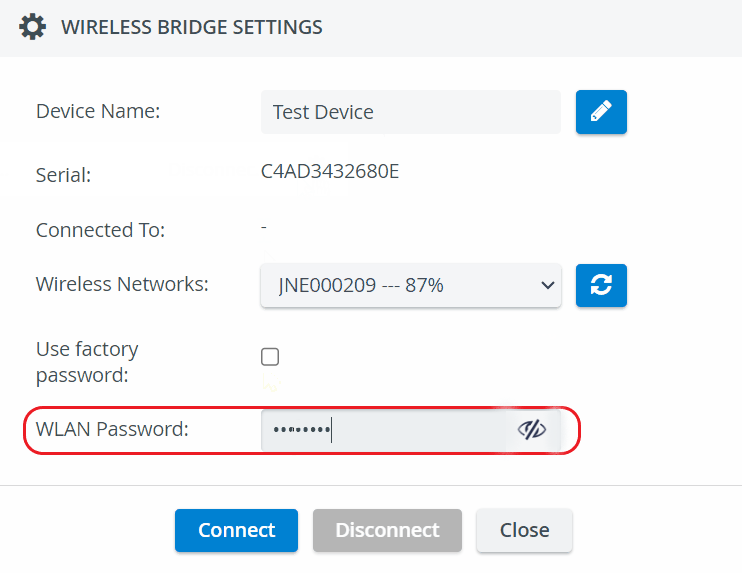
For more information on Custom password handling for wireless bridges, see How to Connect Simulators
Learn more on our System - How-to pages.