iPad support - Technical information
On iPads, Safari is the only supported browser for LearningSpace.
Since the mobile version of LearningSpace offers reduced functionality compared to the full website, you must switch to the full desktop version to access all available features and capabilities.
You can force mobile Safari to request and load the full version of LearningSpace with the following steps:
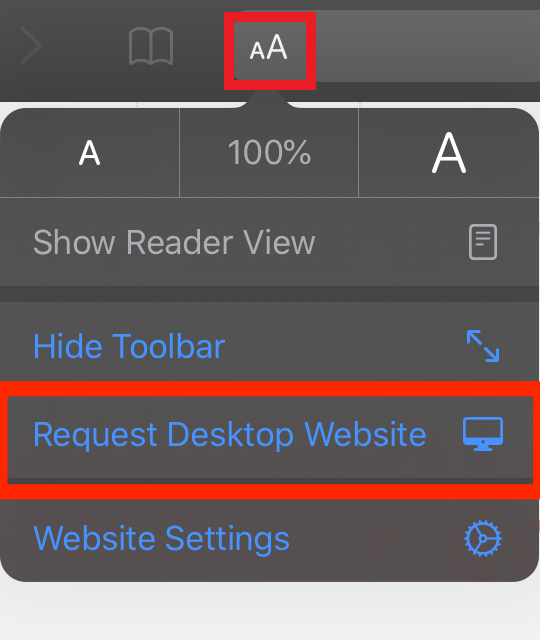
After launching LearningSpace in Safari, press the aA option in the address bar.
A dropdown menu will show up just below the button, giving you the option to Request Desktop Website.
Tap on the dropdown, which will prompt Safari to reload the current page. This time, it should reflect the same experience you would have on a Mac or PC.
iPad Exp.mp4
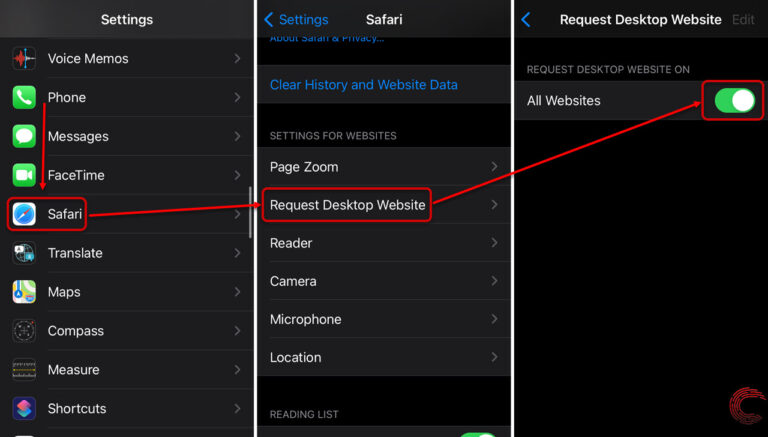
To permanently set Desktop mode, proceed with the following steps via Settings:
The Push-to-Talk function of Intercom is not supported on iPads in LearningSpace.