How can an SSL certificate be acquired?
The Intercom functionality of LearningSpace requires the web browser to have access to the microphone of the client PC, which in turn requires a secure HTTPS connection to the LearningSpace server.
That is, the client computer's microphone can only be used with a valid SSL certificate. (This restriction stems from the Chrome browser security regulations.)
IMPORTANT: For SSL secure access setup, an SSL certificate has to be acquired.
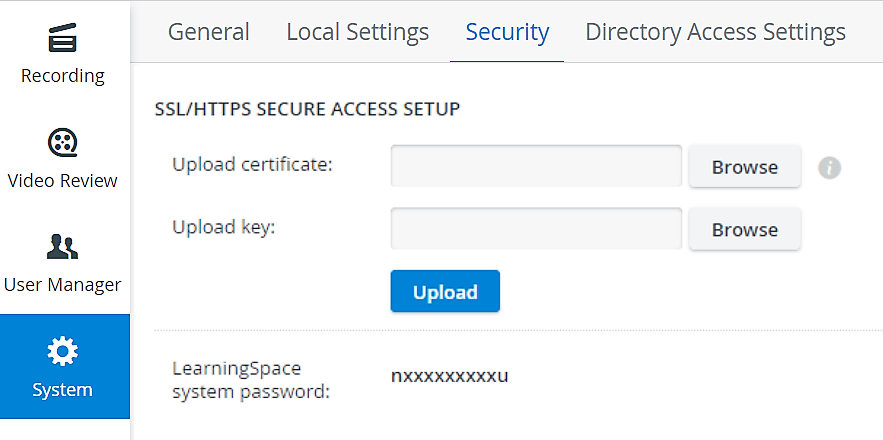
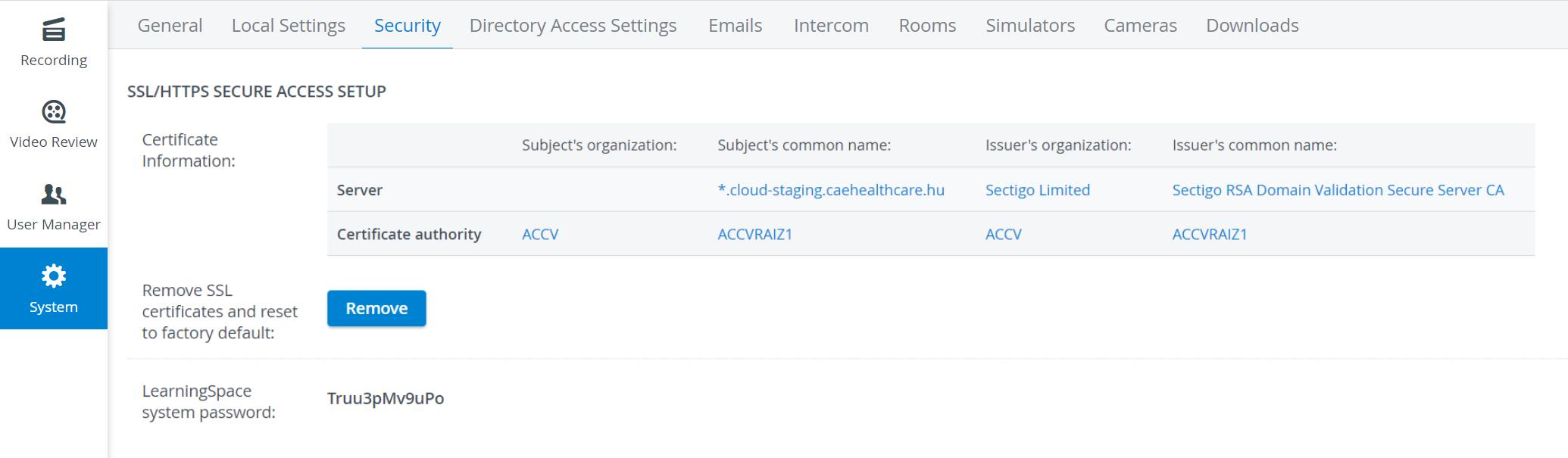
SSL Certificates can be managed on the Security tab of the System module.
Security tab without SSL certificate:
With SSL certificate acquired:
New certificate and key can be uploaded to the system the following way:
Remove expired certificate (Remove button) - this will reset the status to factory default.
Select the new certificate and key (Browse button).
Click on the Upload button. Certificate data will be listed in the Certificate Information table.
⚠️ In case of any issues during upload, contact the Support team.
ℹ️ If the HTTPS certificate request/upload tool is enabled on your LearningSpace system, the page will look as below:
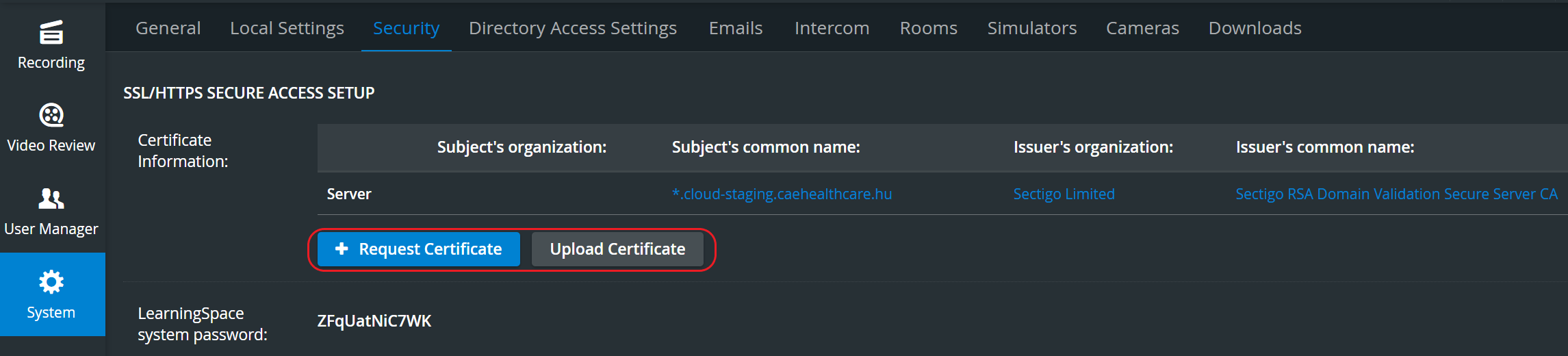
For a step-by-step guide, go to How to use the HTTPS certificate request/upload tool.
Process of acquiring an SSL certificate:
Generate a CSR (Certificate Signing Request) which requires the following data:
Country Name (full name) [e.g., United States of America]
State or Province Name (full name) [e.g., Some-State]
Locality Name (e.g., city) [Charleston]
Organization Name (e.g., company) [e.g., Internet Widgits Pty Ltd]
Organizational Unit Name (e.g., section) [College of Nursing]
Common Name (e.g., server FQDN) [e.g., somecollege.edu]
Email Address [university@edu.cc]If the relevant authority does not provide the possibility of generating a CSR, the local IT department or the LearningSpace Support Team can do it—if given the above data.
IMPORTANT: When generating a CSR, a CSR file and a key are created. The key must be treated with the utmost discretion: it must not be shared even with the certificate signing authority.
In possession of a CSR, a valid and signed SSL certificate can be purchased from a certificate authority.
The coding and format of the certificate can be selected on the site of the signing authority during the signing process. LearningSpace requires the "standard" format, the BASE64 encoded X.509 (PEM) certificate.
Intermediate/ Chain certificate:
If the signing authority is not a root CA, then a so-called Intermediate or Chain certificate is also provided along with the SSL certificate. In such case, the Intermediate/ Chain certificate has to be copied into the signed certificate in the following way:
Open a text editor for the signed certificate and the intermediate certificate separately.
Copy the content of the intermediate certificate.
Paste the content of the intermediate certificate to the end of the signed certificate.
IMPORTANT: The signed certificate often does not contain a last line break. If the content of the intermediate certificate is pasted without the last line break, it can result in an error in file format. When uploading such an erroneously formatted file (see example below), it makes the web-server operation impossible and the LearningSpace system inaccessible!
Example of a properly created signed certificate file including an intermediate certificate >
-----BEGIN CERTIFICATE-----
MIIDqDCCApCgAwIBAgIJANWihKdBRAmRMA0GCSqGSIb3DQEBCwUAMGkxCzAJBgNV
BAYTAlVTMRMwEQYDVQQIDApTb21lLVN0YXRlMQ0wCwYDVQQHDARDaXR5MSEwHwYD
............ (full content of the signed certificate) ......
HVbLN9xKezHPBf28I2IEy+9RK1ftSyKezXzE51GXgJxH4TFbDt94QIfVJsiKAhPX
QT45QMTZTIBWX9avY0dAaodHxQVxmVFNckuDw+3Jwd9BrDKb0wNa9L4O2cZLGZt4
DDCmlbU1PfWShttPG9lW6g5qDe76AgiuTh0V1A==
-----END CERTIFICATE-----
-----BEGIN CERTIFICATE-----
SW50ZXJuZXQgV2lkZ2l0cyBQdHkgTHRkMRMwEQYDVQQDDApleGFtcGxlLmNhMIIB
IjANBgkqhkiG9w0BAQEFAAOCAQ8AMIIBCgKCAQEAvNhKYOOMWBVmVpZVc49WBfG6
mdAq8KYgYfJUMx6WgJBaZlCWdRjywvnCp7XxwId5QZv+coPdxBdWMl2QixT9gtKO
C+xnRjCJta63SNh1Wv4hOc53EuQujRJWTwitb1LgR4IZrRiiEHT4gyk06DpHEUMw
............ (full content of the intermediate certificate) ......
Ot80gu+xtYI+H9MF66JrTSjzXlPS8BVkpH61QU1k5nZ7cmz2EGpDUygZvF4S5f0E
zs8he2Xzr3EXUGSKN533SuCW7iTmCEPZhnRnmJ5MEbuiPvqhhQqATZpuv4lw/pW8
HVbLN9xKezHPBf28I2IEy+9RKDijRJWTwitb1L==
-----END CERTIFICATE-----
Example of an erroneously created signed certificate file including an intermediate certificate >
HVbLN9xKezHPBf28I2IEy+9RK1ftSyKezXzE51GXgJxH4TFbDt94QIfVJsiKAhPX
QT45QMTZTIBWX9avY0dAaodHxQVxmVFNckuDw+3Jwd9BrDKb0wNa9L4O2cZLGZt4
DDCmlbU1PfWShttPG9lW6g5qDe76AgiuTh0V1A==
-----END CERTIFICATE----------BEGIN CERTIFICATE-----
SW50ZXJuZXQgV2lkZ2l0cyBQdHkgTHRkMRMwEQYDVQQDDApleGFtcGxlLmNhMIIB IjANBgkqhkiG9w0BAQEFAAOCAQ8AMIIBCgKCAQEAvNhKYOOMWBVmVpZVc49WBfG6
mdAq8KYgYfJUMx6WgJBaZlCWdRjywvnCp7XxwId5QZv+coPdxBdWMl2QixT9gtKO