How can a camera be connected to the system?
LearningSpace recognizes any system-compatible camera physically connected to the hardware (server, ONE Box unit, Ultraportable).
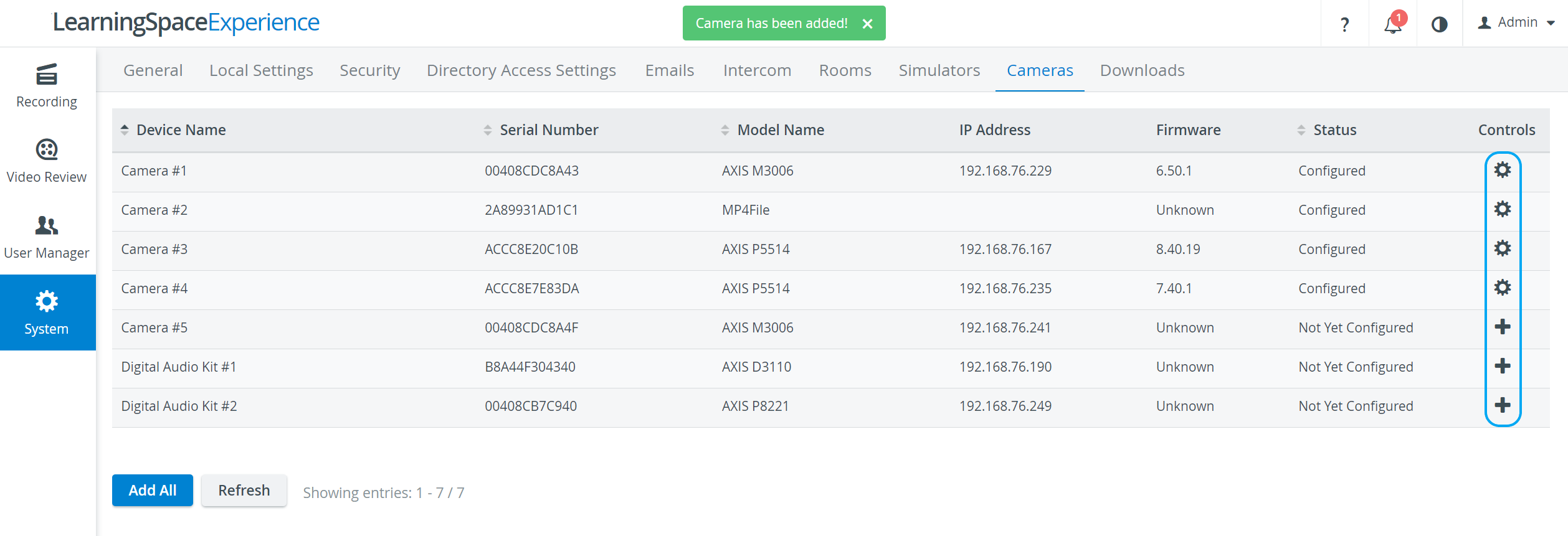
The recognized devices are listed on the Cameras tab of the System module (that is only accessible for users with Admin role).
The Control column indicates the status of the listed cameras:
 Plus icon - the camera has been connected to the system but is yet to be configured: click the icon to add the camera.
- Cogwheel - the camera has been connected and configured, thus available to be added to a room.

- Minus icon - previously configured camera has disappeared.


Clicking the cogwheel icon opens the Camera Settings pop-up where different settings of the selected camera can be adjusted.
All changes can be made effective by using the Refresh button at the bottom of the page.
All available cameras are automatically added to the system by using the Add All button.
For further information, visit our System Module pages.