How can I add a new Learning module?
A new Learning module can only be added via the New SCE pop-up when creating a new SCE by clicking the plus button next to the Learning module drop-down menu.
An SCE can only be created within a learning module and can be assigned to one learning module. The assignment may be changed within the SCE Details.
Creating New Learning Modules
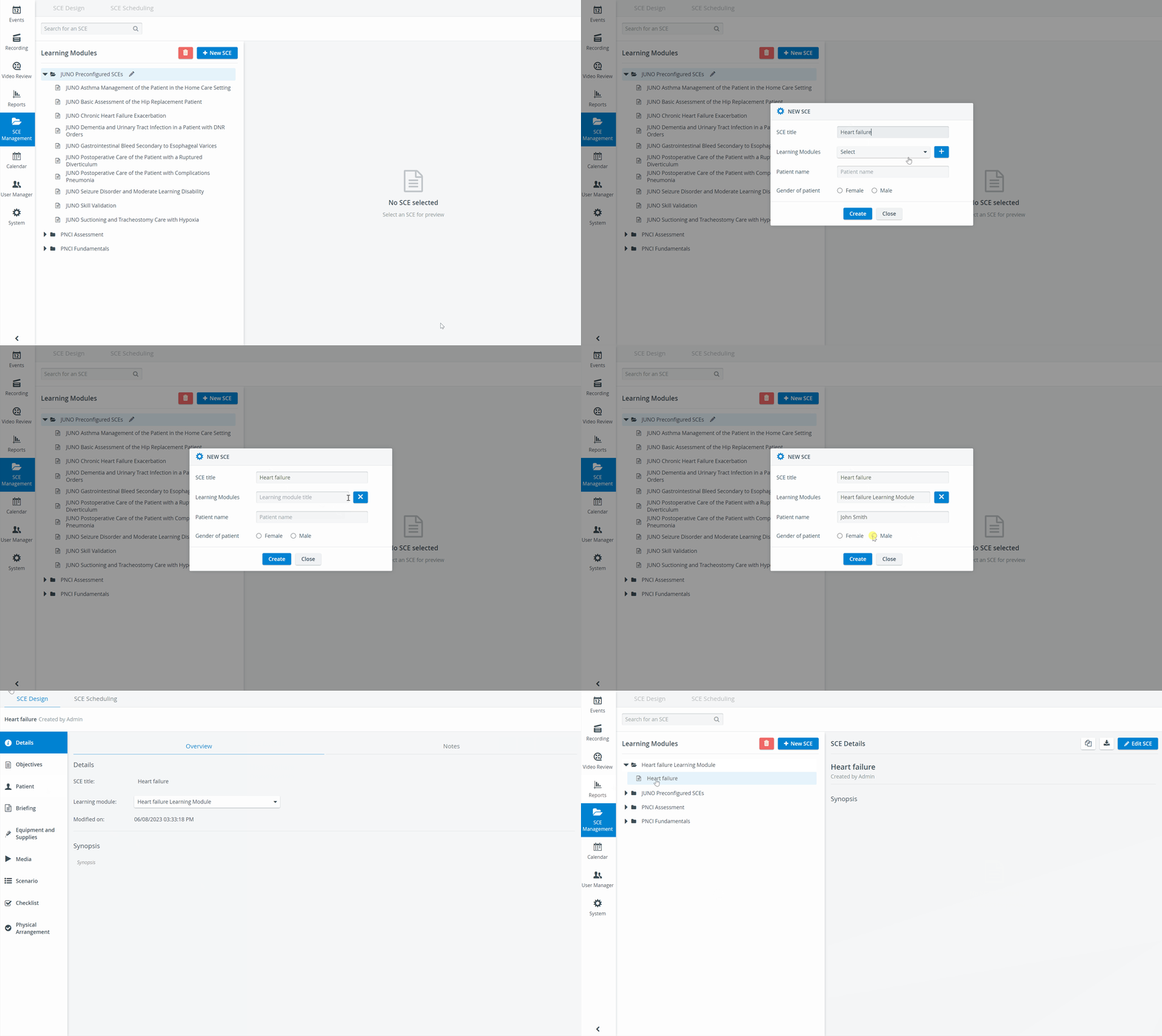
A New Learning module can be added in the New SCE pop-up. To create a new SCE, please follow these steps:
Click on the 'New SCE' button next to the Learning module drop-down menu
Populate the fields of the box that pop up: Give your clinical experience a title (SCE title) and add the patient's name and gender.
Add the new SCE to an existing Learning Module (select the target from the Learning Modules dropdown), or add it to a new Learning Module (hit the ➕ sign next to the Learning Modules dropdown).

Type the new module's name in the field and hit 'Create.'
Following either way, you will be taken to the SCE Design page.

Once the modifications are concluded, click the ✔️


See also Deletion of Learning modules and Deletion of SCEs.
For further information, visit our SCE Management and SCE Management - FAQ pages.