How can I activate Demo Users in the system?
You can activate Demo users in your LearningSpace Essentials system to test different parts without the risk of affecting real users within it. Demo users will expire at the end of each day, but any changes made to them are saved, so by re-activating them, you can continue with the tests.
Demo users are inactive by default but can be activated for one day (the day of activation).
Activating demo users individually (only with Admin privilege):
Demo users can be activated individually in the User Manager by taking out the tick from the Inactive checkbox in the Edit User pop-up for the intended demo user.
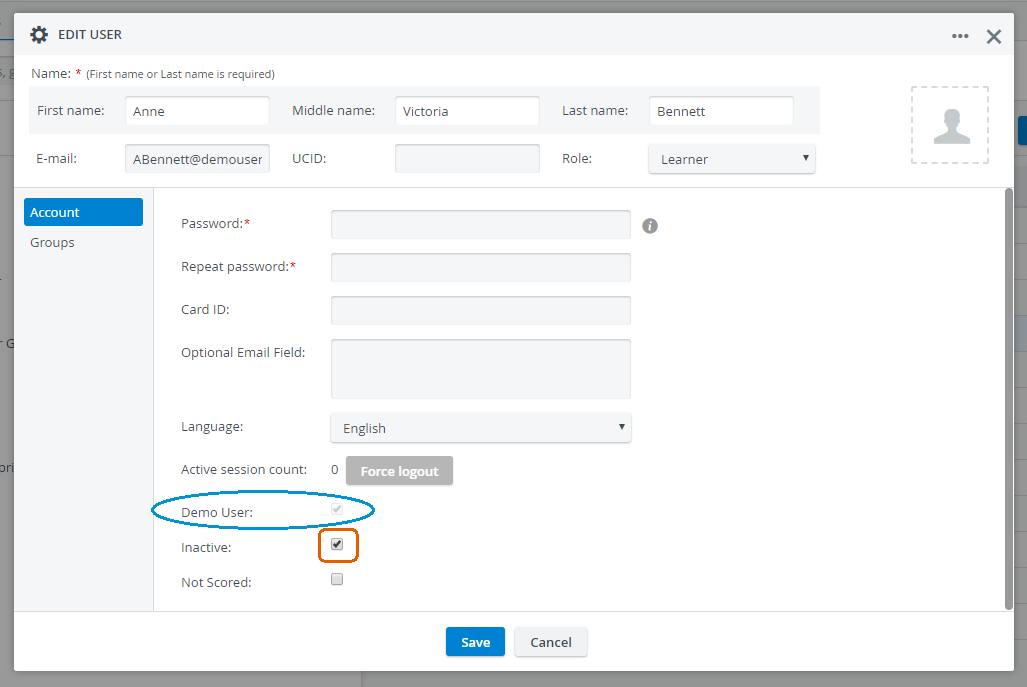
IMPORTANT: In case of individual activation, the demo user's password must be provided in the Edit User pop-up (by the activating user).
Activating all demo users (only with Admin privilege):
The activation can be done for all demo users as a group on the General tab of the System module by clicking the Activate Demo Users for Today button.
Once the demo users have been activated via the button, a confirmation pop-up window appears with a single password to be used for all demo users.
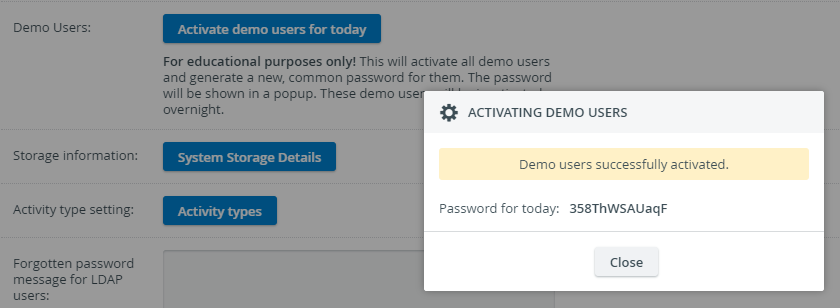
The password is deleted by the daily maintenance process running overnight, deactivating all demo users.
IMPORTANT: Once the pop-up is closed, the generated password will no longer be retrievable. Therefore, it is recommended to be copied and saved.
If the generated password is lost, the process can be repeated, generating a new one.
NOTE: The Activate Demo Users for Today button overrides all previous settings; that is, if a demo user has been individually activated before, their password will change to the system-generated one.