Data Entry as a Learner
Data Entry is the process of filling out the different checklists that can be prepared within LearningSpace, in other words, submitting responses to items incorporated in sections that build up a checklist. Depending on the participant group the checklist is prepared for, users with different roles complete the data entry.
Learners submit data entry for assessment purposes. They answer questions eliciting their competence (or individual feedback). Therefore, responses are mainly scored:
Pre-Sim Checklist
Post-Sim Checklist
Evaluation
Learners can access the checklist(s) they must fill out via a link on their Your Events panel (Dashboard) at the title of the relevant simulation event. Once clicking the link, the system displays the checklist with the event title, the SCE (Simulated Clinical Experience), and the name of the user at the top of the checklist.
NOTE: In the middle of the header, the user is informed about the progression of the filling out of the checklist through a progression bar and numeric information referring to how many of all the questions the user has already answered.
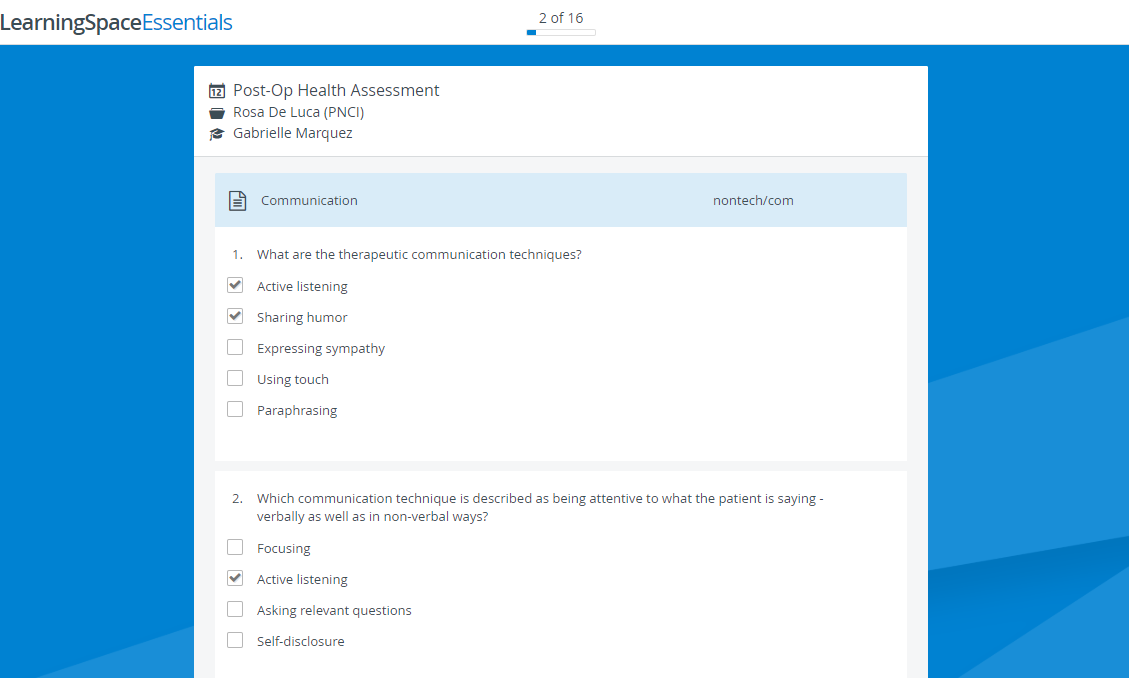
Some questions may have an info icon displayed next to them. Clicking the icon prompts additional information to be shown below the question.
