RNSA - How to Reserve a Room Without Scheduling
What does RNSA mean?
RNSA stands for Running Non-Scheduled Activity.
Why use the RNSA setup?
With the RNSA setup, recording can be entirely manual (from SRV or CO) or controlled by user actions on the workstations assigned to the Activity.
💡 Any running Activity can be assigned to a room in the Rooms tab in the System.
You can specify the Case immediately, but it is not necessary; you can address it later.
If you do not want your learners to rotate on a strict schedule, use the RNSA setup. Plan ahead and reserve a room for your chosen Activity.
If you would like to hide camera views from your Faculty members, the best solution is to use RNSA in all the Rooms where you do not want them to access live view (camera stream). To do this, the selected Faculty members should not be members of the Running Non-Scheduled Activity’s Faculty group.
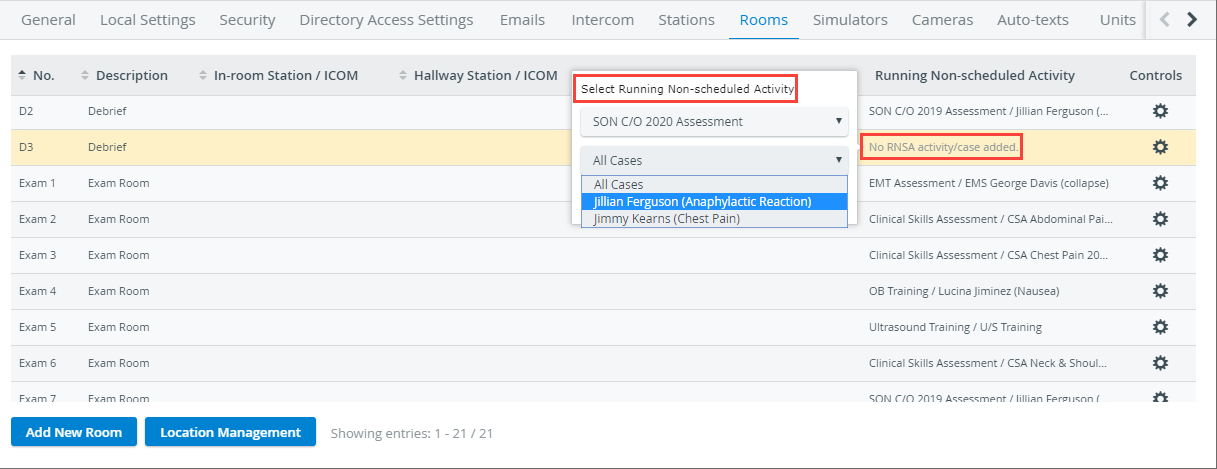
Adding Running Non-scheduled Activity to a Room
How to set a Running Non-Scheduled Activity in a room?
Enter System Manager.
Select Rooms.
Find a room where you want to set up the Activity.
In the Running Non-scheduled Activity column, click ‘No RNSA Activity/Case added’ or the Activity if one has already been added.
The Select Running Non-scheduled Activity tab pops up.Select an Activity from the first drop-down.
💡 Optional: select a single Case, or choose "All Cases".

Entering Recording, the RNSA setting will appear on the room's tab in Center Overview (CO) and in the Record control panel of the room if you continue to Single Room View (SRV).
IMPORTANT: Video recordings are tied to the RNSA Activity/Case/Learner/SP if started by the user action, but not if started via the Recording module or by the push button.
See How to Set Up User-Action-Controlled Video Recording.
NOTE: Scheduled events always overwrite RNSA.
This means that recording will start and stop in a room according to the schedule - if one is present in that room simultaneously with the RNSA - and RNSA settings will be ignored by the system at that time.
By setting up an RNSA in a room, you can continue setting up manually authorized workstations for the Activity.
Find out more about logging your users into the system using manually authorized workstations here.
For further information, visit our Activity Manager, Activity - How to pages, and view our Activity Manager Training Videos.