Live Streaming Video for Students and Standardized Patients
As you know, LearningSpace can stream live video to any computer when the user is logged in with the appropriate privileges and group membership.
Faculty with the Live Video or Video Control (basic or full-control version) privilege can easily access live streams.
Learners and SPs do not have live video access.
You can make live video available to Learners and SPs by following these steps:
Go to Users.
Click on the Roles tab.
Create a new Role in the Add new role field at the bottom, named “Learner + Live Video” (or whatever name you prefer).
Assign the Learner and Live Video or Video Control privileges to the new role.
Live Video privilege lets the user view the live video feed, but the user cannot start or stop recording or pan/tilt/zoom the cameras.
Video Control privilege allows users to view live video feeds, start and stop recording, and control the cameras (not ideal for this use case).
Once you have created the role, apply it to all Learners and SPs who will need to see live video.
Create an Activity or Activities for viewing and recording.
Make sure to add the learners (with the new role) who need to see the live video to the Activity's Faculty group.
Learners and SPs will be able to see live video of any room not assigned to an Activity.
To control which rooms SPs and learners can see, we recommend blocking rooms visible to these users by assigning a Running Non-Scheduled Activity (RNSA) to the room on the Rooms tab in the System module.
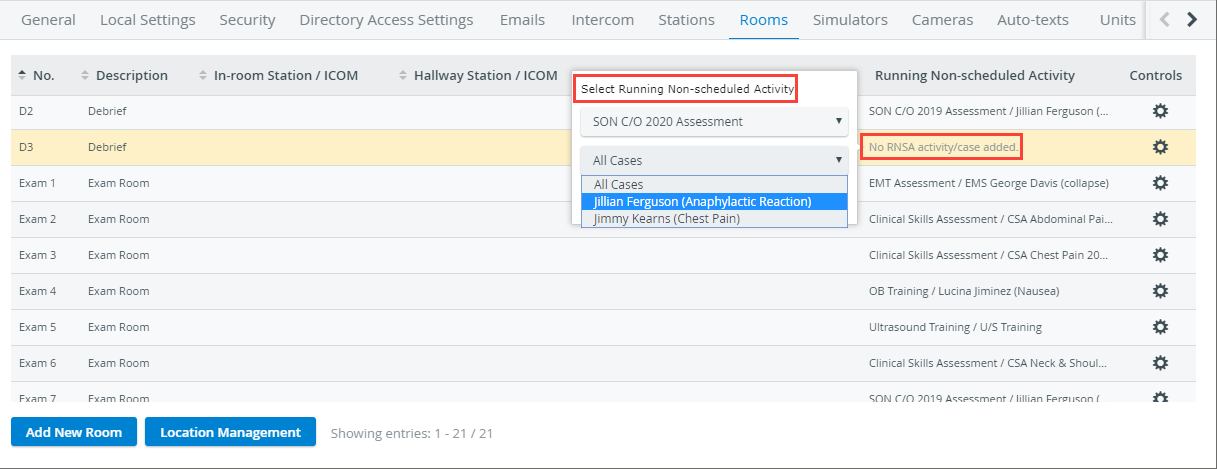
Learner and SP access to specific rooms can then be managed using one of the following methods:
Assign the Activity to the room by using the Advanced Scheduling tool.
Assign the Activity directly to the room as a Running Non-Scheduled Activity (RNSA) on the Rooms tab in the System module.
Generic Live Video Viewer Account
Depending on your needs, you could also create a generic user account for live video access by following the above steps and then providing the login information to your students and SPs.