Field Merge Tags for E. P. Template Authoring
Labels below are to be used in the following format: #{…}#
# TITLE: activity title - valid for all.
# FULLNAME, SORTNAME, LASTNAME, FIRSTNAME: learner name - valid for all.
# S_SCORE: learner section score in the current section, in percentage, e.g., 70% - valid in section items only.
#** C_SCORE**: percentage case total score, in percentage, e.g., 73% - valid in the case and section items only.
# E_SCORE: learner activity total score, in percentage, e.g., 71% - valid for all.
# S_AVG, S_STDEV: class section average and standard deviation in the current section in percentage, e.g., 72.24%, 12.54% - valid for section items only.
# C_AVG, C_STDEV: class case average and standard deviation in percentage, e.g., 72.24%, 12.54% - valid for case and section items only.
# E_AVG, E_STDEV: class total average and standard deviation in percentage, e.g., 72.24%, 12.54% - valid for all.
# S_SCORE*: learner section score in points, e.g., 14 - valid in section items only.
# S_AVG: class section average in points, e.g., 14.24 - valid in section items only.
# S_TOTAL: section score in points, e.g., 20 - valid in section items only.
# S_STDEV*: section score standard deviation in points, e.g., 4.54 - valid in section items only.
#** S_AB**: "above" or "below" depending on whether S_SCORE > S_AVG or not - valid in section items only.
# SA_SCORE: "cross-case total" score for the current skill area - valid for skill area items only.
# SA_AVG: "cross-case total" average for the current skill area - valid for skill area items only.
# SA_AB: "above" or "below" depending on whether SA_SCORE > SA_AVG or not - valid for skill area items only.
# MISSED_ITEMS: a bulleted list with the "phrase" of the items that the student did not get the (maximum possible) point value or got an answer with a 0 value - valid for section items only.
#** BELOW_AVG_ABOVE_ITEMS**: in the report, replaced by a 3-part list:
Below average for: <<ITEMS1>>
Average for: <<ITEMS2>>
Above average for: <<ITEMS3>>
Valid for section items only.
# CORRECT_* - The CORRECT_ label can be used to say if a learner was or was not able to answer a question correctly.
It is built by using the following information:
The Case name or short identifier
The Part identifier (case-sensitive)
SP
PREL = Pre-encounter learner
POSTL = Post-encounter learner
FON
CE = Case Evaluation
The Item number (Item = Question in LearningSpace)
An option element:
were_were not
did_did not
n/a
#{CORRECT_short identifier_part identifier_item number_option element}#
When you use the Case name instead of the short identifier, you must put the Case name in double quotes:
#CORRECT_”case name”_part identifier_item number_option element}#
Example: you want to use the#{CORRECT}# merge tag to create the following statement for question 3 in the FON for the Case “Young Woman Anaphylaxis” whose short identifier is “Hx.”
You answered the question correctly/incorrectly.
The statement with the #{CORRECT}# merge tag and Short Identifier looks like this:
You answered the question #{CORRECT_Hx_FON_3_correctly_incorrectly}#.
The same statement with the #{CORRECT}# tag and the Case name looks like this:
You answered the question #{CORRECT_”Young Woman Anaphylaxis”_FON_3_correctly_incorrectly}#.
Example Nr.2.: “Lashon, you correctly identified/did not identify the signs for myocardial infarction.”
#{FIRSTNAME#}, you #{CORRECT_“George Davis”_POSTL_3_correctly identified_did not identify}# the signs for myocardial infarction.
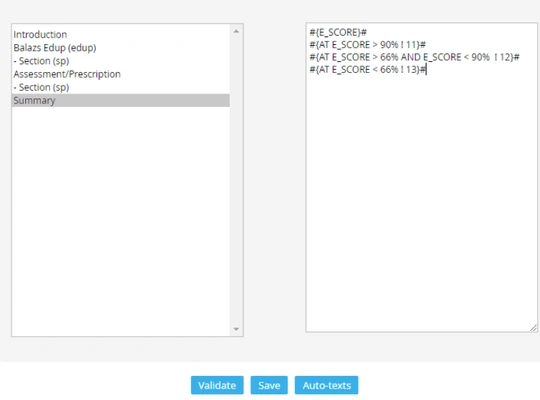
Example #2: You wish to have three different autotexts sent out to the learners based on their achieved scores:
"Overall Score. You received a score of __%. Based on this score,
_- (>90%) You performed well._
- (75-90%) You performed satisfactorily.
- (<75%) Your performance on this encounter was not yet on target for this point in the curriculum."
Autotext merge tags should be set up as follows in EP Template authoring:
Overall Score:
You received a score of #{E_SCORE}#
Based on this score,
#{AT E_SCORE > 90% ! 6}#
#{AT E_SCORE > 74.5% AND E_SCORE< 90% ! 7}#
#{AT E_SCORE < 75% ! 8}#
Please note that you can use "AND" and "OR" (logical switches) to specify the range of scores and conditions a specific autotext should be associated with.
PRACTICAL EXAMPLES FOR THE UTILIZATION OF MERGE TAGS WITHIN TEXTUAL EVALUATION:
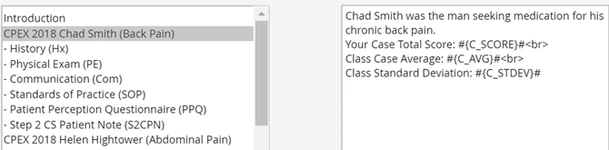
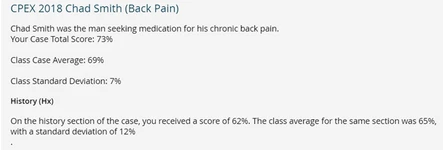
Your Case Total Score: #{C_SCORE}#
Class Case Average: #{C_AVG}#
Class Standard Deviation: #{C_STDEV}#
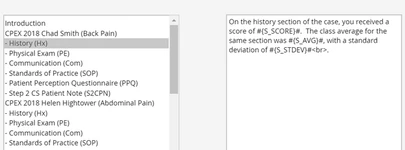
On the history section of the case, you received a score of #{S_SCORE}#.
The class average for the same section was #{S_AVG}#, with a standard deviation of #{S_STDEV}#
On the physical examination section of the case, you received a score of #{S_SCORE}#.
The class average for the same section was #{S_AVG}#, with a standard deviation of #{S_STDEV}#
For the communication component of this case, your score was #{S_SCORE}#.
The class average for this section was #{S_AVG}#, with a standard deviation of #{S_STDEV}#
Assessment/Prescription:
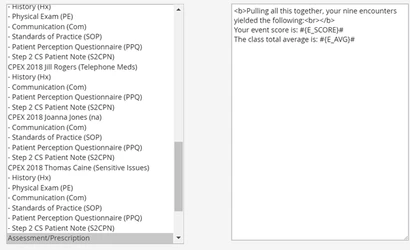
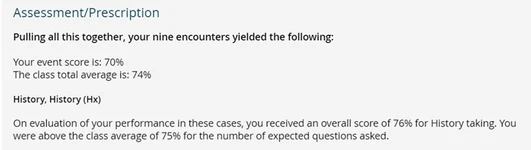
Pulling all this together, your nine encounters yielded the following:
Your event score is: #{E_SCORE}#
The class total average is: #{E_AVG}#
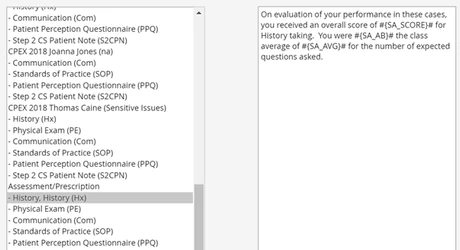
History Skill area:
On evaluating your performance in these cases, you received an overall score of #{SA_SCORE}# for History taking. You were #{SA_AB}# the class average of #{SA_AVG}# for the number of expected questions asked.
Physical exam Skill area:
On evaluating your performance in these cases, you received an overall score of #{SA_SCORE}# for physical examination. You were #{SA_AB}# the class average of #{SA_AVG}# for this section of the assessment.
Communication Skill area:
On evaluating your performance in all cases, you received an overall score of #{SA_SCORE}# for communication. You were #{SA_AB}# the class average of #{SA_AVG}# for this section of the assessment.
Some communication items were also scored in the patient perception questionnaire. Again, reviewing comments made to you by the SP may be helpful here.
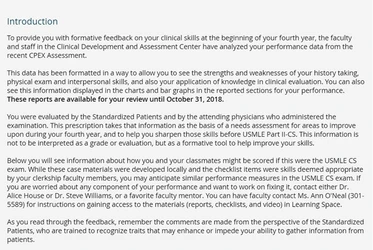
INTRODUCTION:
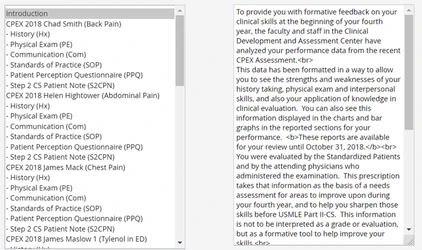
DISPLAYED IN THE EDUCATIONAL PRESCRIPTION REPORT AS:
TEXTUAL EVALUATION RELATED TO A CASE:
TEXTUAL EVALUATION RELATED TO A CASE SECTION:
DISPLAYED IN THE REPORTS AS:
THE ASSESSMENT/PRESCRIPTION part (based on skill areas)
DISPLAYED IN THE REPORTS AS:
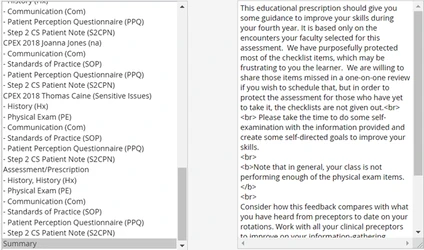
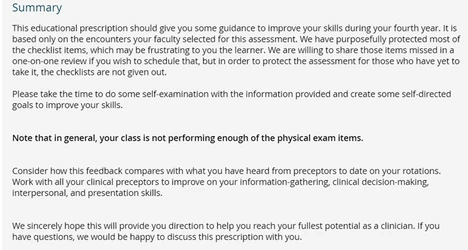
A SUMMARY
DISPLAYED IN THE REPORTS AS:
Learn more on our Reports Module or by watching the Reports Module Training Videos