Evaluating Item Reliability
In LearningSpace, a statistical number can help determine whether an item reflects the necessary knowledge and show the correlation between certain answers and Case total scores.
Point Biserial Value (PBS)
The Point Biserial (PBS) value shows how likely it is that students who selected a certain answer for an item would get a high overall score in the Case. The value ranges from -1 to +1.
The higher this value is, the higher the correlation between the answer and the Case total score.
In LearningSpace, this value can be applied either to the correct answer or to each answer, depending on the Activity Reporting Setup.
If applied to the correct answer, the higher the point-biserial value, the "better" the item. That is, reliable items have a high PBS value, meaning that they are selected by learners with high overall results in the Case. By contrast, items with low PBS values (below zero) tend to get selected by learners with weaker final results in the Case.

Mc = Case total average for learners answering items correctly
Mi = Case total average for learners answering items incorrectly
St = standard deviation for the whole Case
c = proportion of the learners in the learner group of the activity answering correctly
i = proportion of the learners in the learner group of the activity answering incorrectly
Example:
A checkbox item has three possible answers, with 1, 2, and 3-point answers.
There are 10 learners in the learner group.
Seven got the maximum 6 points, but they achieved only 60 percent as their Case total scores.
The other three members of the group achieved 3 points for the item, but they have 90 percent Case totals.
In this case, if the point-biserial (PBS) value is calculated for the "correct" answer of the item, and the answer is regarded as correct if the achieved point value for it is 100% of the max (set on the Activity Reporting Setup page), then the PBS is the following:

This shows that all learners with the "correct" answers for the item belong to the "bad" group, based on the Case Total Performance. It is obviously more complicated; however, the methodology is the same.
On the Activity Reporting Setup page, it can be determined if the "correct" answer(s) should be those that result in the maximum achievable point value for the item, or a certain portion of the maximum points should already be regarded as a correct answer. The maximum achievable score is obvious for questions with one possible answer choice, while for items with multiple possible answer choices (i.e., checkbox or scroll box questions), the maximum score is the sum of the achievable points for all the answers.
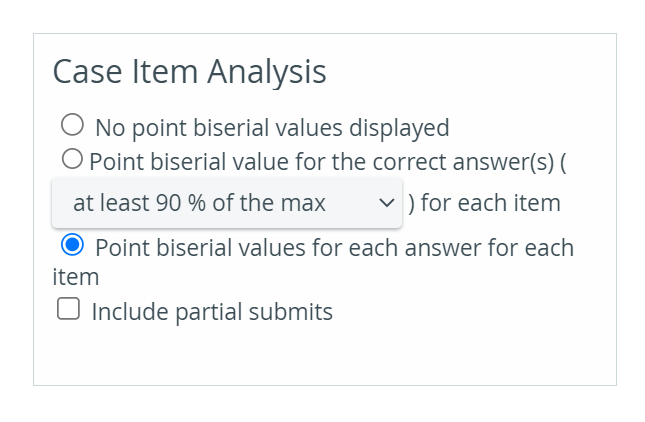
The point-biserial value is displayed in the Case Item Analysis.

For further information, see the Reports - How to pages and the Reports Module Training Videos.