Activity Input Review
The Activity Input Review report provides feedback on Learners' completed records and video recordings.

The table
lists all the participating Learners,
displays whether they have completed records for any Case parts of the Cases assigned to the Activity (PostL checklist submitted by the Learners themselves, SP or FON checklists submitted by SPs or FON Data entry users, etc.),
as well as whether there is a video recording ('V') about the encounter.
NOTE: Partial submits are not displayed in this report.
The hyperlinks in each column/row lead to the respective data:
the 'x' in the Video recording column takes you to the associated video recording
the 'x' in the PostL, CE, etc. columns takes you to the associated records (i.e., submitted checklists)
The names in the SP and FON columns take you to the associated record (i.e., submitted checklists)

The Date displayed in each row shows the time of the first submitted checklist for the respective Learner and Case.
Select the radio button to reorder the table according to the options Sort by names or Sort by Dates.
Options can be selected at the top of the page:
Show Dates
Show Links to Videos & Specific Parts
Show names
Smart Scrollbars
Auto refresh
The page is automatically refreshed every 30 seconds.
Printing a Report
To print an Activity Input Review Report (either on paper or PDF), use the Print button in the top right corner of the screen.
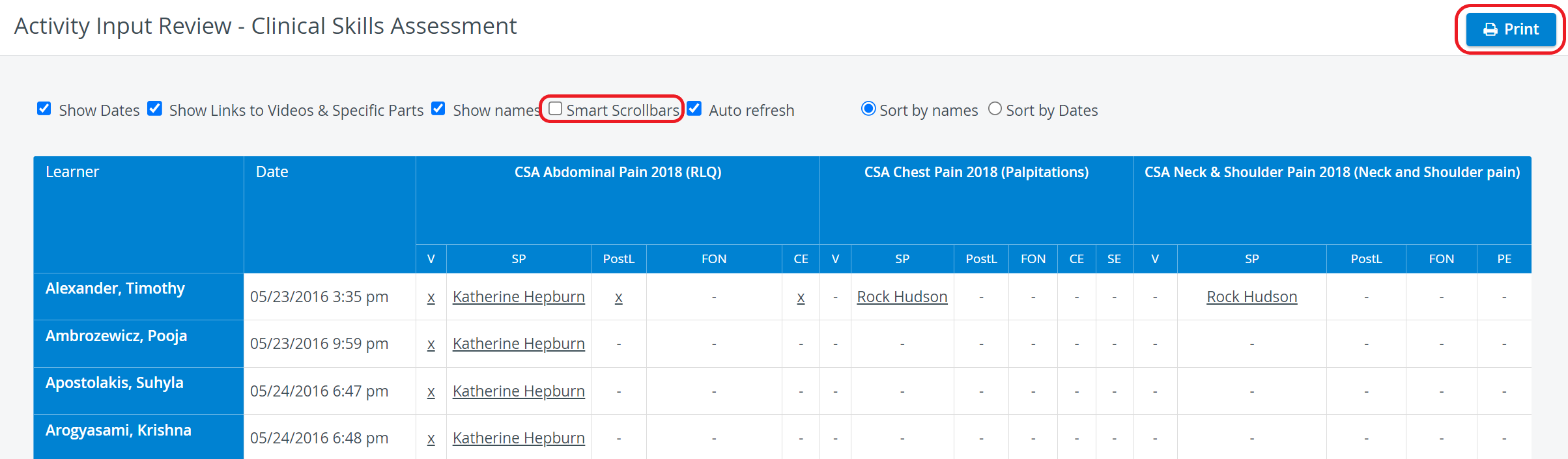

The smart scrollbar needs to be turned off before printing reports.
For more information, go to How to Print a Report.
Export to Excel
In the latest versions of LearningSpace, reports can also be exported to an Excel (xls) file for more convenient management and an essentially easier use of the exported data in applications like Microsoft Excel or Google Sheets.


For further information, see the Reports - How to pages and the Reports Module Training Videos.